
BET877 Payment Methods Deposit and Withdrawal Guide

Introduction of BET877 Payment Methods
BET877 Payment Methods are an important part of managing deposits and withdrawals on the platform. The payment interface displays several options, including JazzCash, Easypaisa, bank transfer, third-party wallets, QRIS, PKPAY Wallet, and cryptocurrency. The available choices may depend on the selected payment section, account eligibility, and current service conditions.
Understanding these options before making a transaction can help users choose the appropriate payment channel and avoid mistakes. This guide explains the visible deposit methods, wallet payment options, receiving account settings, withdrawal methods, and important points to review before submitting a payment request.
BET877 Deposit Payment Methods
The deposit section displays different ways to add funds to an account. Users can select the payment category shown on the screen and review the available instructions before continuing.
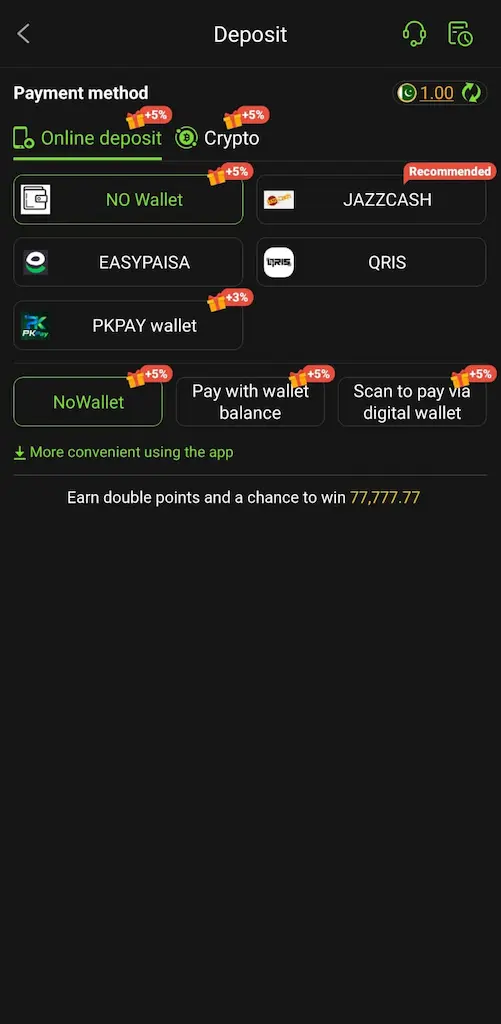
The visible online deposit options include NO Wallet, JazzCash, Easypaisa, QRIS, and PKPAY Wallet. A separate Crypto tab is also displayed. The interface includes promotional labels beside some options, but users should confirm the applicable terms before assuming that a bonus will be credited.
BET877 Online Deposit Payment Methods
The Online Deposit tab displays several payment options in one place. This section helps users identify the payment channel they intend to use without navigating through unrelated account settings.
Before choosing a method, check its availability, any displayed minimum or maximum amount, and the payment instructions. Enter the requested information carefully and retain the transaction reference when one is provided.
BET877 NO Wallet Deposit Payment Methods
NO Wallet appears as a selectable option in the online deposit section. The interface also displays a separate NoWallet choice among the available payment actions.
The precise meaning and processing rules for this option should be confirmed through the platform’s instructions. Before proceeding, check whether it requires an external payment, an existing wallet balance, or another supported action.
BET877 JazzCash Deposit Payment Methods
JazzCash is listed as one of the deposit methods. Users who prefer this local mobile wallet should select the JazzCash option and follow the instructions provided on the payment page.
Check the recipient information, transaction amount, and account details before authorizing a payment. If a transaction reference or confirmation is generated, keep it for future reference. Never send money to a recipient whose details cannot be verified.
BET877 Easypaisa Deposit Payment Methods
Easypaisa is another visible option in the BET877 online deposit section. Its presence provides a payment choice for users who use the Easypaisa mobile wallet.
Before making a deposit, review the displayed payment instructions and confirm the intended recipient. Check the amount twice before approving the transaction. If the payment is unsuccessful or the account balance does not update, keep the transaction record and contact support through a verified channel.
BET877 QRIS Deposit Payment Methods
QRIS appears as a separate payment option in the deposit menu. QR-based payment methods generally use a scannable code to identify payment information, but the exact QRIS procedure available on BET877 should be checked on the current payment page.
If a QR code is provided, scan it only through a compatible and trusted payment application. Verify the recipient and amount shown in that application before confirming anything.
BET877 PKPAY Wallet Deposit Payment Methods
PKPAY Wallet is displayed as another selectable deposit method. A promotional label showing +3% is visible beside this option in the supplied interface.
The displayed percentage should not be treated as a guaranteed reward. Check the promotion’s eligibility, conditions, validity, and any transaction restrictions before relying on it. Follow the payment instructions shown for PKPAY Wallet and save the transaction confirmation where available.
BET877 Crypto Deposit Payment Methods
The deposit screen includes a separate Crypto tab alongside Online Deposit. This indicates that a cryptocurrency-related payment category is presented in the interface.
Users should verify which digital assets and networks are actually supported before considering this option. Cryptocurrency transfers may be irreversible, and sending funds through an incompatible network can result in permanent loss. Check the destination address and network carefully, and understand any applicable fees and local legal requirements.
BET877 Wallet Payment Methods
The deposit interface also presents three additional payment choices: NoWallet, Pay with Wallet Balance, and Scan to Pay via Digital Wallet. These options appear beneath the main payment method list.
BET877 NoWallet Payment Methods
The NoWallet option is displayed with a +5% promotional label. Its exact function and eligibility requirements are not established by the interface alone.
Review the relevant payment instructions and promotional terms before selecting it. Do not assume that every deposit qualifies for the displayed percentage or that the reward is automatically added to the account.
BET877 Pay with Wallet Balance
The Pay with Wallet Balance option provides a separate choice within the payment interface. Before using it, check whether the required balance is already available and whether the transaction is eligible for this method.
Confirm the amount that will be deducted and review the final transaction details before authorizing payment. If the balance is insufficient, follow the platform’s stated instructions rather than repeating an unsuccessful transaction.
BET877 Scan to Pay via Digital Wallet Payment Methods
Scan to Pay via Digital Wallet is another visible payment choice. This type of option may involve scanning a payment code through a compatible digital wallet, depending on the instructions provided.
Always verify the recipient name, payment amount, and transaction details inside the wallet application. A successful scan does not by itself confirm that a payment has been completed.
BET877 Deposit Bonuses and Promotional Offers
The supplied deposit interface displays promotional labels of +5% beside several options and +3% beside PKPAY Wallet. It also contains a message promoting double points and a chance to win 77,777.77.
These figures are displayed promotional information, not proof that every user will receive a reward. Before participating, check the applicable offer conditions, eligibility rules, validity period, and any restrictions on withdrawing promotional funds.
BET877 +5% Deposit Promotion
Several payment choices display a +5% label. However, the interface does not establish the complete terms of these offers.
Check which transactions qualify, whether a minimum deposit is required, and whether the promotion must be claimed separately. Do not deposit money solely to obtain a promotional reward.
BET877 +3% PKPAY Wallet Promotion
The PKPAY Wallet option displays a +3% label. Users should verify the offer details before making a transaction.
The credited amount, if any, may depend on conditions that are not visible in the payment menu. Review the full terms and confirm the final amount before proceeding.
BET877 Double Points and Prize Promotion
A promotional message states that users can earn double points and have a chance to win 77,777.77. The screen does not explain the complete eligibility rules or prize conditions.
Read the official offer details to understand how points are awarded, when the promotion applies, and what requirements govern participation. A chance to win is not a guaranteed prize.
BET877 Withdrawal Payment Methods
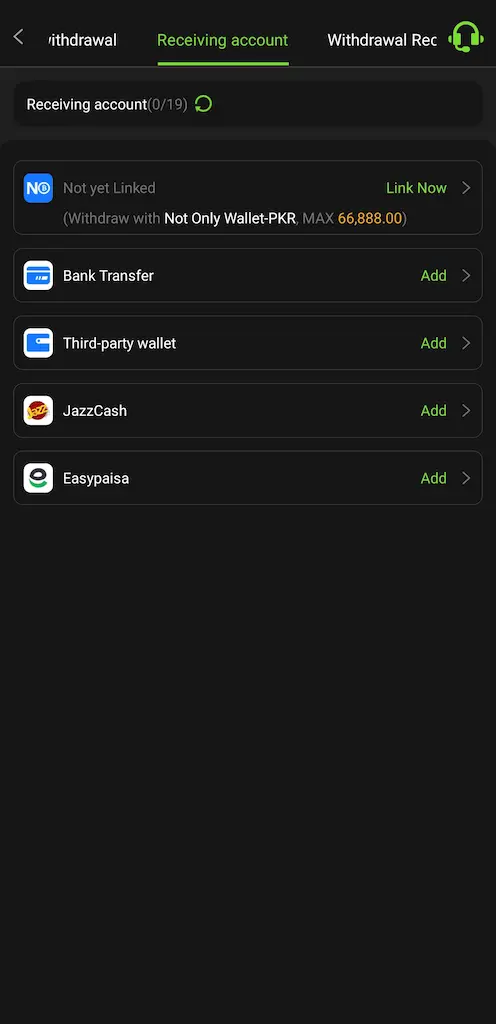
The withdrawal interface includes a Receiving Account section where users can view or add payment destinations. The displayed options include a Not yet Linked account, Bank Transfer, Third-party Wallet, JazzCash, and Easypaisa.
The receiving account section indicates that payment details may need to be linked before a withdrawal can be requested through a particular method. The exact verification requirements and processing times should be confirmed on the platform.
BET877 Receiving Account Setup
The Receiving Account tab displays a counter marked 0/19 and a refresh icon. The screen also provides options to link or add different payment destinations.
Before adding an account, check which information is required and whether the account must be registered in your own name. Enter accurate details and review them carefully. Linking an account does not necessarily mean that a withdrawal has been approved or processed.
BET877 Not Yet Linked Account
The interface displays a Not yet Linked entry with a Link Now option. It also includes a withdrawal-related note mentioning Not Only Wallet-PKR and a maximum figure of 66,888.00.
The full meaning and conditions of this note are not established by the visible screen. Confirm the supported account type, applicable limit, and any verification requirements before using this route.
If the platform asks you to link an account, follow only the instructions on a verified website or application. Avoid sharing passwords, one-time codes, or unrelated banking credentials.
BET877 Bank Transfer Withdrawal Payment Methods
Bank Transfer is listed as an available receiving account option. Users who want to receive funds through a bank should review the required account information before selecting Add.
Check the account holder’s name, account number or other requested banking details, and any applicable withdrawal conditions. Incorrect information may cause delays or a failed transaction.
Processing times, fees, and withdrawal limits should be confirmed before submitting a request. Keep the transaction reference and any confirmation message until the payment has been resolved.
BET877 Third-Party Wallet Withdrawal Payment Methods
The Receiving Account screen includes a Third-party Wallet option with an Add control. This suggests that the interface provides a way to enter or link a supported wallet destination.
The screenshot does not identify every supported wallet or establish whether third-party accounts belonging to other people are permitted. Review the account rules and use only a payment destination that meets the platform’s requirements.
Confirm all wallet details before saving them. Do not assume that adding a wallet guarantees withdrawal approval.
BET877 JazzCash Withdrawal Payment Methods
JazzCash appears in the Receiving Account list as a destination that can be added. Users who intend to receive money through JazzCash should follow the account-linking instructions provided by the platform.
Check the registered mobile number and any other requested details before saving the receiving account. Make sure the payment destination is correct and that the account satisfies the applicable requirements.
After submitting a withdrawal request, retain any confirmation or reference number. If the payment is delayed, use a verified support channel to ask about its status.
BET877 Easypaisa Withdrawal Payment Methods
Easypaisa is also listed as a receiving account option. Users can select Add to review the information required for linking an eligible account.
Enter the correct details and verify them before submission. Check any stated withdrawal limits, verification requirements, and processing conditions rather than assuming that every request will be completed immediately.
If a withdrawal is unsuccessful, keep the relevant transaction details and contact verified support. Do not share your PIN or password with anyone claiming to help process the payment.
BET877 Withdrawal Account Verification
Correct receiving account information is essential when requesting a payment. Before submitting a withdrawal, review the saved details and confirm that the selected destination matches the method you intend to use.
The platform may apply additional checks depending on its rules and the payment provider’s requirements. Users should follow legitimate verification instructions and avoid sending sensitive information through unofficial communication channels.
If an account cannot be linked, check the information entered and read the error message carefully. Do not repeatedly add different accounts without first understanding the reason for the problem.
How to Make a BET877 Deposit
The following steps provide a general guide based on the visible deposit interface. The exact sequence may vary according to the selected method.
Do not repeat a payment immediately if its status is unclear. First check whether the original transaction is pending or has already been completed.
How to Request a BET877 Withdrawal
The receiving account screen suggests that a supported payment destination may need to be added before requesting a withdrawal. Use the current platform instructions to complete the process.
These are general steps, not a guarantee of the exact current withdrawal procedure. Confirm the minimum and maximum amounts, processing time, and applicable fees before submitting a request.
Common BET877 Payment Problems
BET877 Deposit Not Credited
Check the transaction status in your payment application and confirm that the payment was completed. Keep the reference number and contact verified support if the account balance remains unchanged.
BET877 Receiving Account Cannot Be Added
Review the details you entered and check whether the selected account type is supported. If the problem continues, use the official support option shown in the application.
BET877 Withdrawal Is Delayed
A delayed payment may require further review or confirmation. Check the displayed status and any stated processing conditions before submitting another request.
BET877 Payment Option Is Unavailable
Payment methods may change or become temporarily unavailable. Follow the options currently shown in your account and do not use unofficial intermediaries to bypass restrictions.
BET877 Payment Security Tips
Payment security should remain a priority when using any online service. Verify the website or application before entering financial information, and use payment accounts that you are authorized to operate.
Keep passwords, wallet PINs, and verification codes private. Review transaction details before approving payments, and retain receipts for deposits and withdrawals. If something looks suspicious, stop the transaction and seek help through a verified support channel.
If the service involves real-money betting, losses are possible and no deposit or promotional offer guarantees a profit. Confirm that the service is lawful in your location, meet its age requirements, and never use money intended for essential expenses.
Final Words BET877 Deposit and Withdrawal
The BET877 payment interface displays several deposit and receiving account options, including JazzCash, Easypaisa, QRIS, PKPAY Wallet, Crypto, Bank Transfer, and Third-party Wallet. It also presents wallet-related payment choices and promotional labels.
Before using any method, verify its current availability, review the transaction details, and understand the relevant fees, limits, and conditions. Careful account management and secure payment practices can help reduce avoidable errors when handling deposits or withdrawals.
FAQs About BET877 Payment Methods
Which deposit methods are displayed on BET877?
The supplied interface displays NO Wallet, JazzCash, Easypaisa, QRIS, and PKPAY Wallet under Online Deposit, along with a separate Crypto tab.
Does BET877 support Easypaisa and JazzCash withdrawals?
Both Easypaisa and JazzCash are listed in the Receiving Account section. Their availability for a particular transaction and the applicable requirements should be confirmed on the current platform.
What is the difference between Online Deposit and Crypto?
Online Deposit displays several payment options, including local wallet choices. Crypto is presented as a separate category, but the supported currencies and networks need to be confirmed before use.
What do the +5% and +3% labels mean?
The labels appear beside certain payment options in the supplied interface. The full reward conditions are not shown, so users should check the relevant promotion terms before making a payment.
Can I use a bank account for BET877 withdrawals?
Bank Transfer is listed as an option in the Receiving Account section. Check the current account requirements and withdrawal rules before adding banking details.
How can I resolve a failed BET877 payment?
Check the transaction status, save the payment reference, and review any error message. Contact verified support if the issue remains unresolved, and avoid making a duplicate payment while the original transaction is pending.